
foobar2000 can be a little tricky to setup the UI. So I've produced a short primer to get you going.
So, you've downloaded and installed foobar2000. For the configuration I'm going to show you, you also need to download some other UI components. These are:
Columns UI
Album Art
Chronflow
Download each in turn and place the dlls in the foobar2000 component folder. There's also a couple of imnages which comes with chronflow. Stick those in as well. Note: my foobar2000 components folder can be found at C😛rogram Filesfoobar2000components.
Now start foobar2000. A dialog should appear asking which UI you'd like to use. Go for Columns Ui. If this dialog does not appear, do the following.
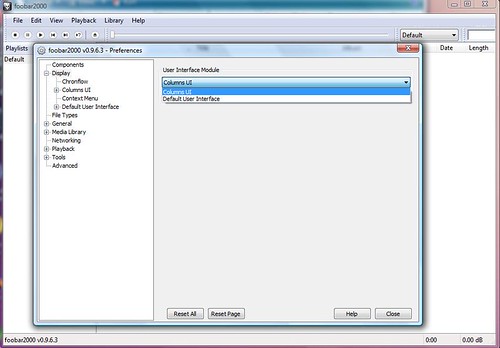
File | Preferences. The preferences dialog appears. Click the Display node. Select Columns UI as the User Interface Module.
We now needto begin configuring the layout of the UI. So click the Columns UI node and click the Layout tab. You'll see something like this.

We able able to create a number of Presets, so that you can switch between configuration if you wish. For this exercise, we'll create a new one, so click the New button, enter a name and click OK. I've called mine "PrimerUI".

Now we have our preset, we can start configuring it. The goal here is to subdivide the window into a number of panels and panels within tabs. To subdivide the window we use splitter panels. Let's start carving up the window and bung in some tabs....right click the Columns Playlist | Change base | Splitters | Horizontal Splitter

Right click the Horizontal splitter | Insert panel | Splitters | Vertical splitter

Right click the Vertical splitter | Insert panel | Splitters | Tab stack

Add two horizontal splitters, one after the other, to the Tab stack. These will be the tabs on your UI.

Then add two vertical splitters to each of the horizontal splitters. These will divide up each tab sheet into panels.

Click the Apply button. Let's have a look at what we've got. Click the Close button.

As we did not update the panel captions, we can relate the screen to the layout configuration in the preferences dialog. The horizontal splitter (which is not visible) holds a vertical splitter. This contains two tabs (the tab stack). Each tab contains a horizontal splitter which is, in turn, divided by two vertical splitters.
Let's start populating these panels with something a bit more interesting. Open up the preferences dialog and navigate to the layout tab. I want to add a some panels to the first vertical splitter within the first horizontal splitter within the tab stack.
So, right click the vertical splitter | Insert panel | Panels | Playlist switcher.

Right click the vertical splitter | Insert panel | Panels | Item properties.

The item properties panel displays data about the track being played/selected. If you want to configure the information displayed, select the Item properties panel you just added and then click the Configure button. The configuration dialog is displayed.

I'll just leave mine as it is for now but you can play with this bit if you wish. To the second vertical splitter within this horizontal splitter I'm going to add a further two panels.
So, right click the vertical splitter | Insert panel | Panels | Chronflow.

So, right click the vertical splitter | Insert panel | Playlist Views | NG Playlist.

Click the Apply button. Let's have a look at what we've got. Click the Close button.

If you haven't set up your media libray yet, you'll see something like the image above (make use you have the first tab selected). So, let's configure the library at this point.
Click Library | Configure. The Preferences dialog appears with the Media Library node selected.
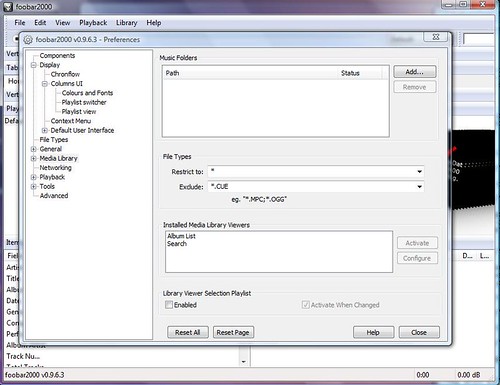
Add the path to your library. Click the Add button and browse to your library.

Click the Select Folder button. Then click the Close button on the Preferences dialog to return to foobar2000 main window. This won't have changed. So reopen the Preferences dialog and under the Display node, click the Chronflow node and then click the Album Source tab.
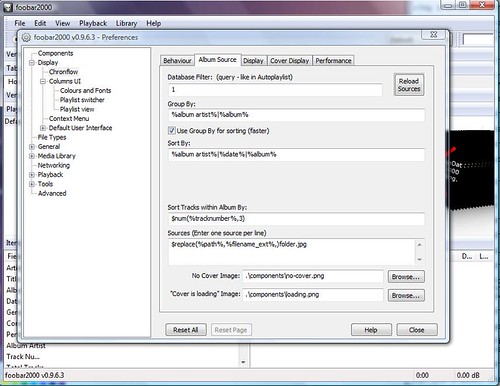
This is where it gets a bit tricky! For Chronflow to find your tracks it needs to understand your library structure and know where to find the album covers. Mine looks like this.

For the tracks, the generalised scheme is
<drive>PublicMusic Library<artist><year> <album title><artist> - <album title> - <track number> - <track name>.flac
The images are similar
<drive>PublicMusic Library<artist><year> <album title><album title>.jpg
So the instruction to Chronflow, using tags, is
E😛ublicMusic Library%artist%%date% %album%%album%.jpg
Depending on your file structure, you will need to enter different instructions/tags. I'll enter mine. They need to go into the Sources textbox, with one source per line.

Now set the "No Cover Image" and "'Cover is loading' Image" paths. If you remember, we dropped these images into the foobar2000 components folder right at the start of this primer. Use the browse buttons to set the paths.

Now click the Reload Sources button and then click Close.

Any luck and you'll see the album covers being displayed. If not, you've got a problem with your instructions to Chronflow. If you double click an album cover, the tracks will be displayed in the Playlist. If you click a track, the track details are displayed in the Item Properties panel and will start playing.

Now let's add some album art to the NG Playlist.
File | Preferences. The preferences dialog appears. Expand the Display | Columns UI. Select the Playlist view and click the General tab.
You'll notice at the bottom there is a section for artwork for NG Playlist. Tick the "Display artwork in groups" checkbox.

Playlist General tab - displaying artwork in groups.
OK. So the NG Playlist will now add a column to display the album art, but it needs to know where to get the images.
Select the Columns UI node and click the Artwork tab. This is where you specify the location of your images. My images are held with the tracks and the path reflects the structure of my library. Yours may/will be different.

Columns UI Artwork tab - the path to your images.
Click the close button and admire the progress so far!

NG Playlist with album art
I'll leave it there for now. If people want more, I'll try and do something later.
So, you've downloaded and installed foobar2000. For the configuration I'm going to show you, you also need to download some other UI components. These are:
Columns UI
Album Art
Chronflow
Download each in turn and place the dlls in the foobar2000 component folder. There's also a couple of imnages which comes with chronflow. Stick those in as well. Note: my foobar2000 components folder can be found at C😛rogram Filesfoobar2000components.
Now start foobar2000. A dialog should appear asking which UI you'd like to use. Go for Columns Ui. If this dialog does not appear, do the following.
File | Preferences. The preferences dialog appears. Click the Display node. Select Columns UI as the User Interface Module.
We now needto begin configuring the layout of the UI. So click the Columns UI node and click the Layout tab. You'll see something like this.
We able able to create a number of Presets, so that you can switch between configuration if you wish. For this exercise, we'll create a new one, so click the New button, enter a name and click OK. I've called mine "PrimerUI".
Now we have our preset, we can start configuring it. The goal here is to subdivide the window into a number of panels and panels within tabs. To subdivide the window we use splitter panels. Let's start carving up the window and bung in some tabs....right click the Columns Playlist | Change base | Splitters | Horizontal Splitter
Right click the Horizontal splitter | Insert panel | Splitters | Vertical splitter
Right click the Vertical splitter | Insert panel | Splitters | Tab stack
Add two horizontal splitters, one after the other, to the Tab stack. These will be the tabs on your UI.
Then add two vertical splitters to each of the horizontal splitters. These will divide up each tab sheet into panels.
Click the Apply button. Let's have a look at what we've got. Click the Close button.
As we did not update the panel captions, we can relate the screen to the layout configuration in the preferences dialog. The horizontal splitter (which is not visible) holds a vertical splitter. This contains two tabs (the tab stack). Each tab contains a horizontal splitter which is, in turn, divided by two vertical splitters.
Let's start populating these panels with something a bit more interesting. Open up the preferences dialog and navigate to the layout tab. I want to add a some panels to the first vertical splitter within the first horizontal splitter within the tab stack.
So, right click the vertical splitter | Insert panel | Panels | Playlist switcher.
Right click the vertical splitter | Insert panel | Panels | Item properties.
The item properties panel displays data about the track being played/selected. If you want to configure the information displayed, select the Item properties panel you just added and then click the Configure button. The configuration dialog is displayed.
I'll just leave mine as it is for now but you can play with this bit if you wish. To the second vertical splitter within this horizontal splitter I'm going to add a further two panels.
So, right click the vertical splitter | Insert panel | Panels | Chronflow.
So, right click the vertical splitter | Insert panel | Playlist Views | NG Playlist.
Click the Apply button. Let's have a look at what we've got. Click the Close button.
If you haven't set up your media libray yet, you'll see something like the image above (make use you have the first tab selected). So, let's configure the library at this point.
Click Library | Configure. The Preferences dialog appears with the Media Library node selected.
Add the path to your library. Click the Add button and browse to your library.
Click the Select Folder button. Then click the Close button on the Preferences dialog to return to foobar2000 main window. This won't have changed. So reopen the Preferences dialog and under the Display node, click the Chronflow node and then click the Album Source tab.
This is where it gets a bit tricky! For Chronflow to find your tracks it needs to understand your library structure and know where to find the album covers. Mine looks like this.
For the tracks, the generalised scheme is
<drive>PublicMusic Library<artist><year> <album title><artist> - <album title> - <track number> - <track name>.flac
The images are similar
<drive>PublicMusic Library<artist><year> <album title><album title>.jpg
So the instruction to Chronflow, using tags, is
E😛ublicMusic Library%artist%%date% %album%%album%.jpg
Depending on your file structure, you will need to enter different instructions/tags. I'll enter mine. They need to go into the Sources textbox, with one source per line.
Now set the "No Cover Image" and "'Cover is loading' Image" paths. If you remember, we dropped these images into the foobar2000 components folder right at the start of this primer. Use the browse buttons to set the paths.
Now click the Reload Sources button and then click Close.
Any luck and you'll see the album covers being displayed. If not, you've got a problem with your instructions to Chronflow. If you double click an album cover, the tracks will be displayed in the Playlist. If you click a track, the track details are displayed in the Item Properties panel and will start playing.
Now let's add some album art to the NG Playlist.
File | Preferences. The preferences dialog appears. Expand the Display | Columns UI. Select the Playlist view and click the General tab.
You'll notice at the bottom there is a section for artwork for NG Playlist. Tick the "Display artwork in groups" checkbox.
Playlist General tab - displaying artwork in groups.
OK. So the NG Playlist will now add a column to display the album art, but it needs to know where to get the images.
Select the Columns UI node and click the Artwork tab. This is where you specify the location of your images. My images are held with the tracks and the path reflects the structure of my library. Yours may/will be different.
Columns UI Artwork tab - the path to your images.
Click the close button and admire the progress so far!
NG Playlist with album art
I'll leave it there for now. If people want more, I'll try and do something later.


























 Facebook
 Twitter
 Instagram