Hi , got approx 800 cds and want to be able to rip, store and play them through traditional hifi system . Are routes like Bluesound , Brennan , hifi Rose etc a good route to take ? Not sure I can get my head around PC’s , Nash drives and how these hang together and how to access and play . Something relatively simple for the confused 🙂 Currently got a Marantz PM8005 Amp and ND8006 CD and Concept turntable . Thanks in advance

Rip, store & play cd collection
- Thread starter CityFox
- Start date
You are using an out of date browser. It may not display this or other websites correctly.
You should upgrade or use an alternative browser.
You should upgrade or use an alternative browser.

Al ears
Well-known member
- Nov 23, 2008
- 14,068
- 8,613
- 64,070

























I just rip them on my PC, with suitable software, and save them to an external portable USB hard drive.Hi , got approx 800 cds and want to be able to rip, store and play them through traditional hifi system . Are routes like Bluesound , Brennan , hifi Rose etc a good route to take ? Not sure I can get my head around PC’s , Nash drives and how these hang together and how to access and play . Something relatively simple for the confused 🙂 Currently got a Marantz PM8005 Amp and ND8006 CD and Concept turntable . Thanks in advance
USB hard drive then connected to my CD player.
However, if you have that many to do, it's going to take ages whichever route you take.

There have been several threads on this forum dealing with the subject, which you might find useful for answering specific questions - but feel free to ask specific questions.
A mate of mine has just bought a Brennan for simplicity - but simplicity isn't everything and if you can use a PC at all, then a few of us recommend EAC (Exact Audio Copy) for ripping CDs into FLAC files.
Once you've got the files AND BACK UPS on hard drives....you've got plenty of playback options from the likes of Wiim etc.
You will need plenty of time and patience (especially if you want all your metadada / album art to be optimised).
A mate of mine has just bought a Brennan for simplicity - but simplicity isn't everything and if you can use a PC at all, then a few of us recommend EAC (Exact Audio Copy) for ripping CDs into FLAC files.
Once you've got the files AND BACK UPS on hard drives....you've got plenty of playback options from the likes of Wiim etc.
You will need plenty of time and patience (especially if you want all your metadada / album art to be optimised).

Dave_
Well-known member
- Jul 31, 2008
- 1,612
- 908
- 20,570






However, if you have that many to do, it's going to take ages whichever route you take.
I think if I had to do it again, and had hundreds rather than the several thousand I had to rip, I'd seriously consider employing the services of the likes of Ripcaster to do it for me.
CD Conversion Service | ripcaster.co.uk
£720 to rip 800 CDs doesn't actually sound unreasonable to me, compared to the wasted time and tedium of doing it myself
Last edited:

Angle Poise-Lamp
Well-known member
- Feb 3, 2015
- 2,975
- 3,314
- 31,570
I would also recommend EAC for ripping. It can be a bit daunting to setup properly but, online guides are available, e.g. https://wiki.lyrion.org/index.php/EACInstall
GroeneLeeuw
Well-known member
- Nov 4, 2019
- 168
- 164
- 10,770
For storage and playback of the ripped files, an Eversolo like the DMP-A6 is a good option (plus you add a very good streamer) as you can store up to 4TB(or 6TB even, I´m not sure) which is more than enough for your 800 CDs.
As to connect to your amp, simple RCA cables will be enough.
As to connect to your amp, simple RCA cables will be enough.
Something simple is just play CD's. I ripped all my CD's years ago, but bought a CD player again, because it's much nicer to play CD's than fiddling on a smartphone screen to find the albums. And if I don't want to play a CD, I stream the music from Tidal.Hi , got approx 800 cds and want to be able to rip, store and play them through traditional hifi system . Are routes like Bluesound , Brennan , hifi Rose etc a good route to take ? Not sure I can get my head around PC’s , Nash drives and how these hang together and how to access and play . Something relatively simple for the confused 🙂 Currently got a Marantz PM8005 Amp and ND8006 CD and Concept turntable . Thanks in advance

nopiano
Well-known member
- Feb 15, 2009
- 4,968
- 4,879
- 33,570
I have pondered this possibility a few times and always decided to stick with physical discs. Like @RJW232 I am content with that. I realise I’m lucky to have the space to keep all the CDs and various players.
However, if I needed to change and store CDs away, I’d be looking at the Innuos Zen or Zenith devices. I’m sure others can do similar but you just pop the CD in, and it copies, stores, indexes etc., then pops the CD out. They range from affordable to state of the art. The app is good and well supported, which is vital unless you’re able to go the PC and NAS/USB route.
However, if I needed to change and store CDs away, I’d be looking at the Innuos Zen or Zenith devices. I’m sure others can do similar but you just pop the CD in, and it copies, stores, indexes etc., then pops the CD out. They range from affordable to state of the art. The app is good and well supported, which is vital unless you’re able to go the PC and NAS/USB route.

Vincent Kars
Well-known member
- Mar 6, 2021
- 545
- 622
- 11,770
My preference is to rip them on a PC. Yes it is a job and you better do it right the first time so use good ripping software supplying the right meta data (tags).
My preference is dBpoweramp:
How to get the music to your amp? A very simple one is to use a 3.5 (headphone out) to 2x RCA to connect PC and amp. You can improve on the onboard audio by using a good quality USB DAC. This is what I call direct playback and this is my preference. It is snappy, allows for custom tags and is simple to configure.
You might go a more complex way called streaming. You configure any computer in the LAN (your PC, a NAS) as a UPnP server. Sounds complex but this is what happens if you turn on media sharing on a PC or a NAS (Qnap, Synology). You need a streamer like a WiiM. If your amp has analog inputs only, choose one with a good DAC. You use the WiiM app to control playback.
My take on ripping: https://www.thewelltemperedcomputer.com/Intro/Ripping.htm
My preference is dBpoweramp:
- It is fast and stable.
- Easy to configure.
- It supports AccurateRip (they invented it)
- Meta data from GD3, Discogs, SonataDB, Musicbrainz & freedb
- Also a versatile format converter
- Lossless.
- Excellent tagging support including cover art.
- Custom tags stored in the file.
- Checksum stored in the file. This allows you to verify if the audio is corrupted.
- Plays gapless
- Wide support on Win, OSX, Linux, Android.
How to get the music to your amp? A very simple one is to use a 3.5 (headphone out) to 2x RCA to connect PC and amp. You can improve on the onboard audio by using a good quality USB DAC. This is what I call direct playback and this is my preference. It is snappy, allows for custom tags and is simple to configure.
You might go a more complex way called streaming. You configure any computer in the LAN (your PC, a NAS) as a UPnP server. Sounds complex but this is what happens if you turn on media sharing on a PC or a NAS (Qnap, Synology). You need a streamer like a WiiM. If your amp has analog inputs only, choose one with a good DAC. You use the WiiM app to control playback.
My take on ripping: https://www.thewelltemperedcomputer.com/Intro/Ripping.htm
Andrewbanks1964
Active member
- Sep 19, 2025
- 19
- 13
- 25
Please don’t touch Brennan. It’s garbage, cheaply made and with a terrible DAC. It not proper Hifi…it’s like Bang and Olufsen without the good looks.. for ease of use try the Inuous range. Like the Zen Mini. I ripped 6000 CDs with this and only 30 didn’t rip. Almost all of the names were correctly recorded and editing the names is simple.Hi , got approx 800 cds and want to be able to rip, store and play them through traditional hifi system . Are routes like Bluesound , Brennan , hifi Rose etc a good route to take ? Not sure I can get my head around PC’s , Nash drives and how these hang together and how to access and play . Something relatively simple for the confused 🙂 Currently got a Marantz PM8005 Amp and ND8006 CD and Concept turntable . Thanks in advance
Playback is also very easy and user friendly. But best of all is the sound quality, it’s excellent, especially if you get the separate power supply with it.
I didn’t get the Zen power supply preferring a Teddy Pardo unit, very happy with that. The Zen has a very decent DAC although I don’t use its DAC as I plug it into a CARY DMS700 streamer..
You can get a used one from about £1200. The Zen Mini isn’t embarrassed in my system where the other components are 10x more expensive. If you want it as a main source it is very good indeed.
But please don’t touch Brennan! It’s joke-fi.


PieterG
Well-known member
- Nov 1, 2025
- 98
- 104
- 220
Ripping to .flac format is the best option for most use cases. However, if you are using iTunes somewhere, i don't believe they ever included flac support; their lossless format is .alac unfortunately.
The simplest playback route is a USB port on an amp or streamer, which can play from USB connected storage. The most convenient path, in my opinion, is a media server streaming over ethernet or stable wifi, into a playback device that supports DLNA. A Bluesound node or WiiM will do that.
I did a quick search on your cd player, and it does offer a few options:
The simplest playback route is a USB port on an amp or streamer, which can play from USB connected storage. The most convenient path, in my opinion, is a media server streaming over ethernet or stable wifi, into a playback device that supports DLNA. A Bluesound node or WiiM will do that.
I did a quick search on your cd player, and it does offer a few options:
- direct playback from USB drives on front port - must be FAT32 formatted, not NTFS
- streaming over ethernet using Heos app on your phone/tablet
- computer playback (using a music app on the pc) through the Marantz DAC using the rear USB port
Get a NAS
No Nash drives for him 😁Not sure I can get my head around PC’s , Nash drives and how these hang together

Revolutions
Well-known member
- Aug 6, 2023
- 1,230
- 1,677
- 5,570
Vincent Kars
Well-known member
- Mar 6, 2021
- 545
- 622
- 11,770
Sort of what I was hinting at when I said simple isn't always best 😉Please don’t touch Brennan. It’s garbage, cheaply made and with a terrible DAC.

Jasonovich
Well-known member
- Jul 28, 2022
- 4,231
- 3,384
- 19,570
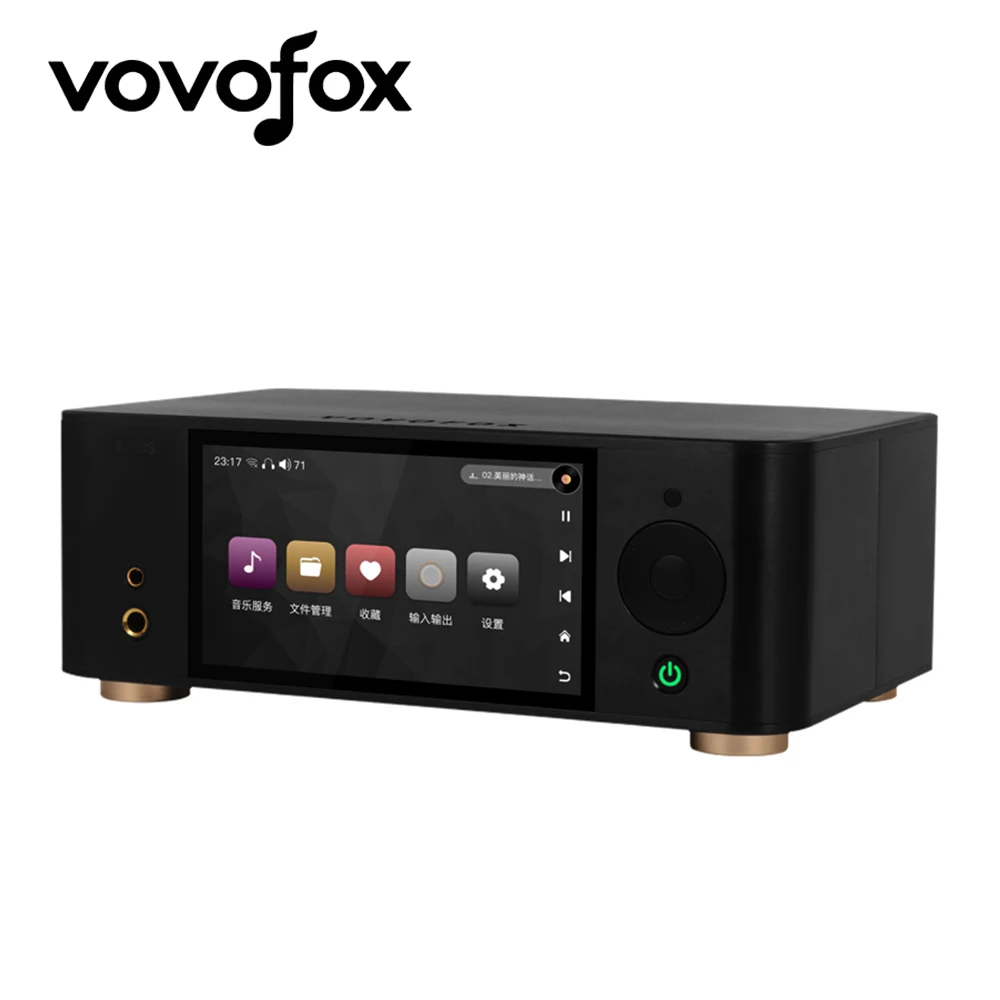
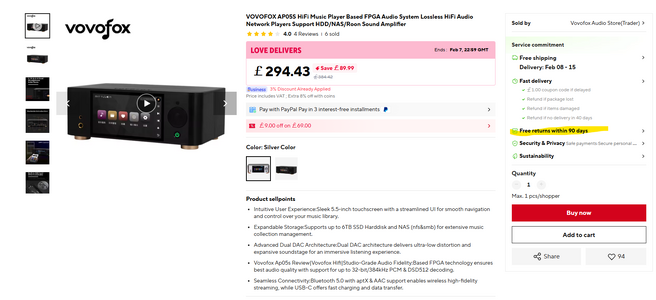
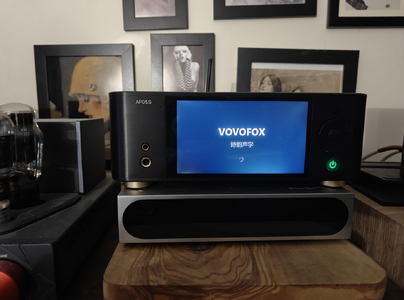
The price of these units Vovofox APO5S - digital media player has come down since I last purchased mine.
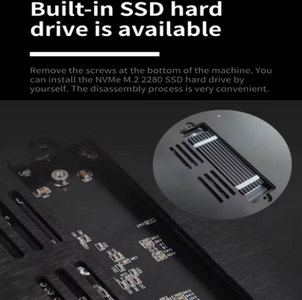
It has an excellent sounding DAC and will play all your music copied on to the SSD hard drive. I'm most pleased with mine and if shopping on AliExpress doesn't bother you, then it's worth a look.
AliExpress has a free 90 day return policy, if for some reason, you're not happy with the product, you can always send back.
Check link below
 www.aliexpress.com
I'm also using my NAS server which can be access by the Vovofox and all the networking around the house, music literally follows me!
I'm using my NAS mainly with my PC. I have 2TB of music stored on it. The music from the NAS feeds into my DAC and that feeds into my headphone amp and this is another way to access your music. When my PC is switched off, I have my Digital Transport also feeding into my DAC but let's not complicate things! 🤣
It has an excellent sounding DAC and will play all your music copied on to the SSD hard drive. I'm most pleased with mine and if shopping on AliExpress doesn't bother you, then it's worth a look.
AliExpress has a free 90 day return policy, if for some reason, you're not happy with the product, you can always send back.
Check link below
VOVOFOX AP05S HiFi-Musik-Player basierend auf FPGA-Audiosystem, verlustfreie HiFi-Audio-Netzwerk-Player, unterstützt HDD/NAS/Roon Sound Amplifier - AliExpress 44
Smarter Shopping, Better Living! Aliexpress.com
www.aliexpress.com
I'm also using my NAS server which can be access by the Vovofox and all the networking around the house, music literally follows me!
I'm using my NAS mainly with my PC. I have 2TB of music stored on it. The music from the NAS feeds into my DAC and that feeds into my headphone amp and this is another way to access your music. When my PC is switched off, I have my Digital Transport also feeding into my DAC but let's not complicate things! 🤣
What's the catch with the £318.77 price Jason?The price of these units Vovofox APO5S - digital media player has come down since I last purchased mine.
It has an excellent sounding DAC and will play all your music copied on to the SSD hard drive. I'm most pleased with mine and if shopping on AliExpress doesn't bother you, then it's worth a look.
AliExpress has a free 90 day return policy, if for some reason, you're not happy with the product, you can always send back.
Check link below
VOVOFOX AP05S HiFi-Musik-Player basierend auf FPGA-Audiosystem, verlustfreie HiFi-Audio-Netzwerk-Player, unterstützt HDD/NAS/Roon Sound Amplifier - AliExpress 44
Smarter Shopping, Better Living! Aliexpress.com
I'm also using my NAS server which can be access by the Vovofox and all the networking around the house, music literally follows me!
I'm using my NAS mainly with my PC. I have 2TB of music stored on it. The music from the NAS feeds into my DAC and that feeds into my headphone amp and this is another way to access your music. When my PC is switched off, I have my Digital Transport also feeding into my DAC but let's not complicate things! 🤣
View attachment 10921
View attachment 10922
Is that subject to possible import duties?
And how about the all-important control app - how does it compare with the popular, favoured ones?
Jasonovich
Well-known member
- Jul 28, 2022
- 4,231
- 3,384
- 19,570
The price has come down to £294. No catch, delivery 2-3 weeks. I purchased from the same vendor, so all good. No import duties, what you see is what you pay, sometimes the VAT catches you but that's it.What's the catch with the £318.77 price Jason?
Is that subject to possible import duties?
And how about the all-important control app - how does it compare with the popular, favoured ones?
It's really a Linux PC, once you navigate around it, you pick up quickly. The apps work well. It's touch screen, you also have a remote. Updating the firmware is pretty straight forward.
I'm not sure you can download any special software on your phone, it's possible there are some apps, I have no need for them!
One thing that will surprise you is the sound quality, it's really good as a stand alone but you can use it as a transport. You can compare the Topping DAC with the bespoke FPGA, see which one you like.
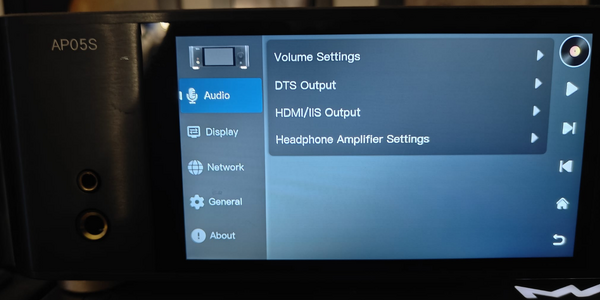
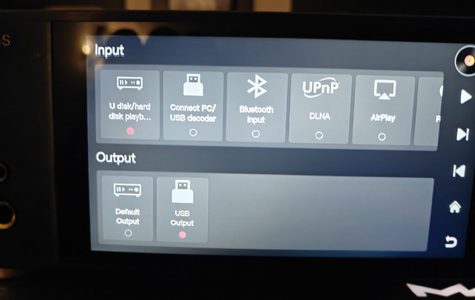
I've taken some photos to give you some idea how it works. It takes about 2-3 minutes to boot up, like your PC. You switch on manually. Your remote will close unit but not power up, weird feature!
I like it, works for me. Every time you copy music on to your NVME SSD, ensure to re-scan it on the search music option from the menu.
Here are the photos 🙂
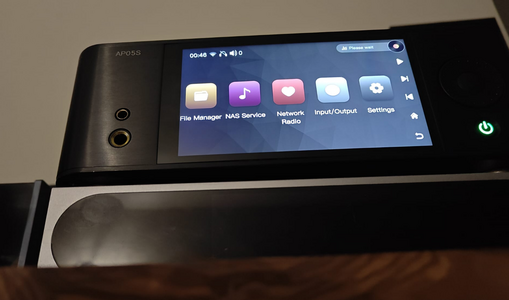
Network Radio still in Chinese, maybe on the next firmware update they'll put it right!
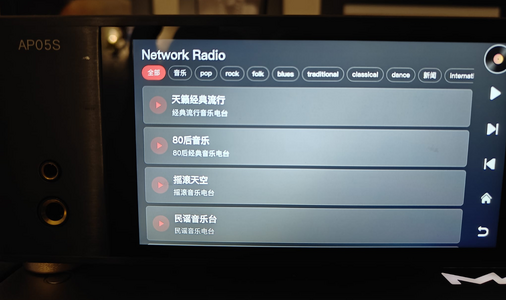
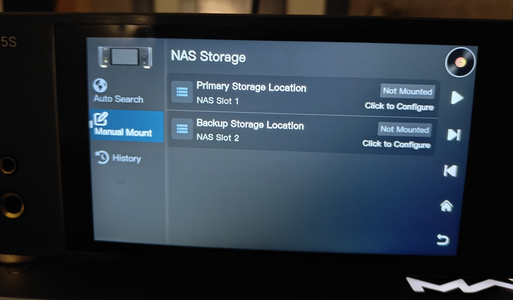
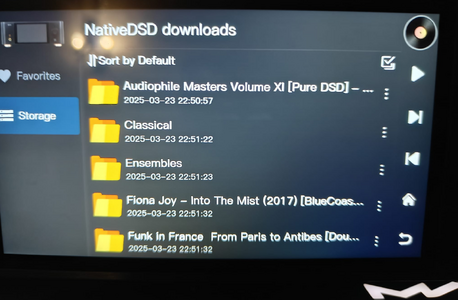
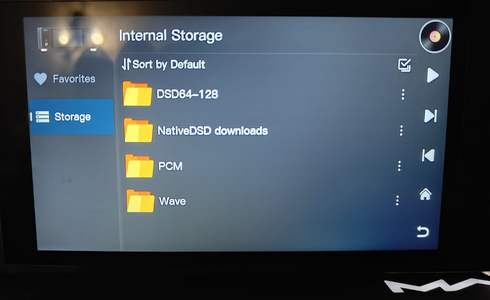
If you're using it as a DAC, it'll play all formats including DSD512.
VOVOFOX AP05S HiFi-Musik-Player basierend auf FPGA-Audiosystem, verlustfreie HiFi-Audio-Netzwerk-Player, unterstützt HDD/NAS/Roon Sound Amplifier - AliExpress 44
Smarter Shopping, Better Living! Aliexpress.com
www.aliexpress.com
Thanks Jason 👍The price has come down to £294. No catch, delivery 2-3 weeks. I purchased from the same vendor, so all good. No import duties, what you see is what you pay, sometimes the VAT catches you but that's it.
It's really a Linux PC, once you navigate around it, you pick up quickly. The apps work well. It's touch screen, you also have a remote. Updating the firmware is pretty straight forward.
I'm not sure you can download any special software on your phone, it's possible there are some apps, I have no need for them!
One thing that will surprise you is the sound quality, it's really good as a stand alone but you can use it as a transport. You can compare the Topping DAC with the bespoke FPGA, see which one you like.
I've taken some photos to give you some idea how it works. It takes about 2-3 minutes to boot up, like your PC. You switch on manually. Your remote will close unit but not power up, weird feature!
I like it, works for me. Every time you copy music on to your NVME SSD, ensure to re-scan it on the search music option from the menu.
Here are the photos 🙂
View attachment 10923
View attachment 10924
View attachment 10925
View attachment 10926
Network Radio still in Chinese, maybe on the next firmware update they'll put it right!
View attachment 10927
View attachment 10928
View attachment 10929
View attachment 10930
If you're using it as a DAC, it'll play all formats including DSD512.
VOVOFOX AP05S HiFi-Musik-Player basierend auf FPGA-Audiosystem, verlustfreie HiFi-Audio-Netzwerk-Player, unterstützt HDD/NAS/Roon Sound Amplifier - AliExpress 44
Smarter Shopping, Better Living! Aliexpress.com
It could be perfect for the OP in this thread to play local files.
I presume you might've discovered that brand because of Ali Express.
Jasonovich
Well-known member
- Jul 28, 2022
- 4,231
- 3,384
- 19,570
Yes I was looking for another digital transport on AliExpress and came across the Vovofox.Thanks Jason 👍
It could be perfect for the OP in this thread to play local files.
I presume you might've discovered that brand because of Ali Express.
Not being funny, but that's a long time. Am i reading that right? My pc boots up 15 seconds!It takes about 2-3 minutes to boot up, like your PC
Jasonovich
Well-known member
- Jul 28, 2022
- 4,231
- 3,384
- 19,570
Slight exaggeration on my part. The Linux software takes about minute or less.Not being funny, but that's a long time. Am i reading that right? My pc boots up 15 seconds!
Still slow. When I was using previous version of firmware, the boot time was even slower.
I think it's trying to initialize the storage memory on boot up, it seems the bigger the capacity, the slower the boot up time.
I suppose Linux doesnt have fast boot, even so a minute sounds like eternity to me. Anyway looks mint as hell.
I have never trusted Aliexpress and have never bought anything from it, hmm.
I have never trusted Aliexpress and have never bought anything from it, hmm.

abacus
Well-known member
- Sep 24, 2008
- 1,713
- 1,673
- 23,070
Anything that has to load an OS first, always takes time to boot, just look at your phone.I suppose Linux doesnt have fast boot, even so a minute sounds like eternity to me. Anyway looks mint as hell.
I have never trusted Aliexpress and have never bought anything from it, hmm.
Bill
Similar threads
- Replies
- 3
- Views
- 6K



Space.com is part of Future plc, an international media group and leading digital publisher. Visit our corporate site.
© Future Publishing Limited Quay House, The Ambury, Bath BA1 1UA. All rights reserved. England and Wales company registration number 2008885.
 Facebook
 Twitter
 Instagram