How To Hi-fi and Windows 11

Mar 1, 2026
1
0
20
Micro$oft recently forced me to buy a new PC, to support Windows 11. So I dipped into my savings, and now I'm spending more hours than I could've believed trying to get my new PC to behave like the old one did. And so to hi-fi and audio:

On Windows 10 (and before), I used foobar2000 to play my locally-stored music collection, using ASIO to pass 'BitPerfect' audio to my USB-connected Chord Mojo 2 DAC, and thereby to my Sennheisser HD800S headphones. And all worked well.

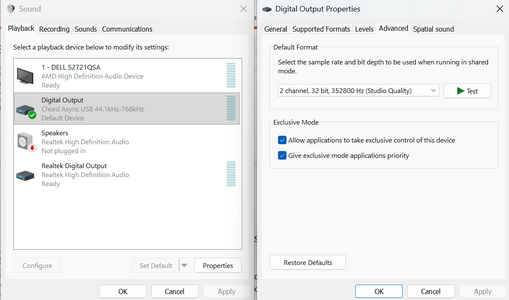
But Windows 11 does not seem to support ASIO or (exclusive) WASAPI. I've tried foobar2000, MusicBee and Winamp, all with ASIO or WASAPI, and Windows mangles my music before I get to hear it. The Windows volume and balance controls are active, which wouldn't be so bad. But my music collection holds mp3s, a few DSD files, and FLAC files, many of them hi-res. Windows resamples my music to whatever single frequency is set in the sound settings. The result is that most files sound like so-so mp3s, even when they're 24/192 top-notch recordings.

Has anyone else had similar problems?

Have you discovered any solutions, or work-arounds?
 
Can only say Win11 is the worst **** piece of SW I´ve ever used.
By chance, I stopped using a laptop as source (which worked great with different music players) since I bought an Eversolo DMP-A6
Glad I did that.

My advice: see an alternative to your PC. Win11 will not improve, quite the opposite! The tendency is to get worse with every new update.
 
Micro$oft recently forced me to buy a new PC, to support Windows 11. So I dipped into my savings, and now I'm spending more hours than I could've believed trying to get my new PC to behave like the old one did. And so to hi-fi and audio:

On Windows 10 (and before), I used foobar2000 to play my locally-stored music collection, using ASIO to pass 'BitPerfect' audio to my USB-connected Chord Mojo 2 DAC, and thereby to my Sennheisser HD800S headphones. And all worked well.

But Windows 11 does not seem to support ASIO or (exclusive) WASAPI. I've tried foobar2000, MusicBee and Winamp, all with ASIO or WASAPI, and Windows mangles my music before I get to hear it. The Windows volume and balance controls are active, which wouldn't be so bad. But my music collection holds mp3s, a few DSD files, and FLAC files, many of them hi-res. Windows resamples my music to whatever single frequency is set in the sound settings. The result is that most files sound like so-so mp3s, even when they're 24/192 top-notch recordings.

Has anyone else had similar problems?

Have you discovered any solutions, or work-arounds?

Windows II is kind of a slow burner, It's essentially Windows 10 with the extra bloat.

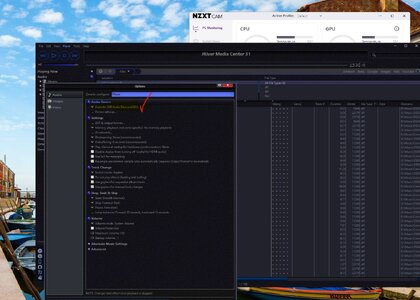
My Windows 11 is fully compatible with XMOS, ASIO, WASPI etc, as per below. Check you have the latest drivers for your device.
I have used Foobar2000 when my setup was Windows 10, it worked perfectly, when I switched to Windows 11, I encountered some problems, I managed eventually to get it to work, I can't recall exactly what I did but I was only getting DOP 256, under Windows 10, I was able to listen to DSD 512 natively.

The difference in sound quality was only marginal. It was kind of an irritation for me, so I switched to JRiver media software.
Not an open-sourced software like FooBar2000 but less buggy, much more solid but you do have to fork out £69 to activate the software and you do get regular updates. There's a trail period of 31 days, you can decide if this is for you.
Worth looking into JRiver if you're using Windows 11.

Screenshot 2026-03-01 172910.jpg
 
  • Like
Reactions: Al ears
Unless it was a really old computer there was no need to buy a new one as there are plenty of workarounds to get Windows to work on unsupported hardware, (Just do a quick google search)

As with all computers (No matter the OS) use an external USB interface for best results, that way the ASIO drivers are not hindered by the OS. (If you have a Mac then you can also use Thunderbolt)

Bill
 
As with all computers (No matter the OS) use an external USB interface for best results, that way the ASIO drivers are not hindered by the OS. (If you have a Mac then you can also use Thunderbolt)
My PC is on Windows 10. I use Foobar2000 and the Asio drivers supplied by Pathos, to send audio via USB to my Pathos Converto, with no problems. Not tried Windows 11 yet, or Ubuntu which I have on dual boot but, am yet to get to grips with.
 

TRENDING THREADS

Latest posts