
- Mar 1, 2026
- 11
- 5
- 25



Micro$oft recently forced me to buy a new PC, to support Windows 11. So I dipped into my savings, and now I'm spending more hours than I could've believed trying to get my new PC to behave like the old one did. And so to hi-fi and audio:
On Windows 10 (and before), I used foobar2000 to play my locally-stored music collection, using ASIO to pass 'BitPerfect' audio to my USB-connected Chord Mojo 2 DAC, and thereby to my Sennheisser HD800S headphones. And all worked well.
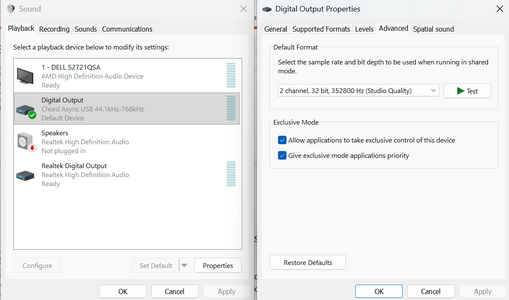
But Windows 11 does not seem to support ASIO or (exclusive) WASAPI. I've tried foobar2000, MusicBee and Winamp, all with ASIO or WASAPI, and Windows mangles my music before I get to hear it. The Windows volume and balance controls are active, which wouldn't be so bad. But my music collection holds mp3s, a few DSD files, and FLAC files, many of them hi-res. Windows resamples my music to whatever single frequency is set in the sound settings. The result is that most files sound like so-so mp3s, even when they're 24/192 top-notch recordings.
Has anyone else had similar problems?
Have you discovered any solutions, or work-arounds?
On Windows 10 (and before), I used foobar2000 to play my locally-stored music collection, using ASIO to pass 'BitPerfect' audio to my USB-connected Chord Mojo 2 DAC, and thereby to my Sennheisser HD800S headphones. And all worked well.
But Windows 11 does not seem to support ASIO or (exclusive) WASAPI. I've tried foobar2000, MusicBee and Winamp, all with ASIO or WASAPI, and Windows mangles my music before I get to hear it. The Windows volume and balance controls are active, which wouldn't be so bad. But my music collection holds mp3s, a few DSD files, and FLAC files, many of them hi-res. Windows resamples my music to whatever single frequency is set in the sound settings. The result is that most files sound like so-so mp3s, even when they're 24/192 top-notch recordings.
Has anyone else had similar problems?
Have you discovered any solutions, or work-arounds?

































 Facebook
 Twitter
 Instagram