














People seem to have issues with loading images from iPhones to this site so I have written up some tips, apologies if this has been done and I didn’t look hard enough.
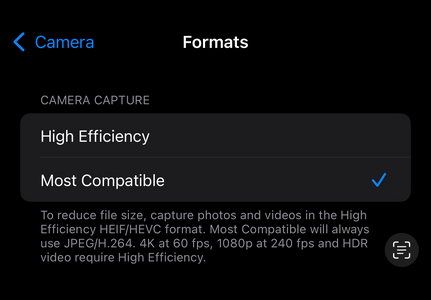
There are two issues at play, one is quite reasonable, the other is a little silly. Firstly, Apple (and sometimes a handful of Androids) use HEIF as default. HEIF is better than JPEG but not everywhere supports it. You can navigate to settings/camera/format and set camera to most compatible, this changes your images to JPEG. This isn’t quite the final solution though.
JPEG originally had the extention .JPEG but old windows systems had a character limit on extensions, so .JPG was born. Apple (hipsters that they are) still use jpegs before they were cool and kept the four character extension. Everywhere else on the internet this shouldn’t matter but for some reason here it does. You can share your image to files app, go to view options to unhide your extensions, then rename it .jpg. This seems like a faff to do every time though.
My preferred solution is to spend a minute or two making a shortcut then not worry about renames or file types ever again. If you don’t use the shortcuts app you should take a look, it’s great stuff and already on your phone.
Shortcuts allows you to automate stuff, in this case we are going to create a simple batch photo converter flow. You can do other stuff like make it open a chosen music app when you pair a specific Bluetooth headphone for instance.
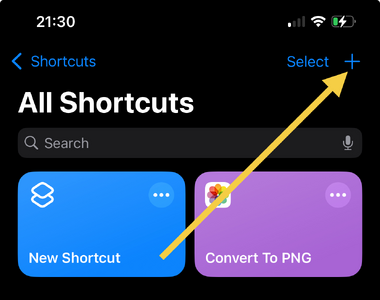
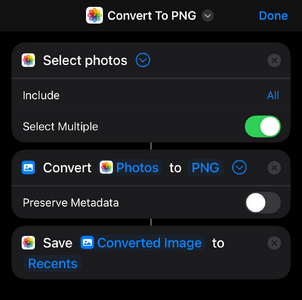
Press the plus icon in the top right of the app to create a new shortcut. In the search action box choose the select photos action. Open it up and tick select multiple so you can do a few at a time.
Next we want to use the convert action, we are going to sidestep the .jpg debacle by converting to .png. Don’t forget to uncheck preserve metadata, this will strip out any location data in your image.
The final action is Save, set it to save to recents in your photo stream. Click done, then you have a shortcut ready to run. It should work on any file type your iPhone can open, and allows you to make screen grabs loadable as well.
There are two issues at play, one is quite reasonable, the other is a little silly. Firstly, Apple (and sometimes a handful of Androids) use HEIF as default. HEIF is better than JPEG but not everywhere supports it. You can navigate to settings/camera/format and set camera to most compatible, this changes your images to JPEG. This isn’t quite the final solution though.
JPEG originally had the extention .JPEG but old windows systems had a character limit on extensions, so .JPG was born. Apple (hipsters that they are) still use jpegs before they were cool and kept the four character extension. Everywhere else on the internet this shouldn’t matter but for some reason here it does. You can share your image to files app, go to view options to unhide your extensions, then rename it .jpg. This seems like a faff to do every time though.
My preferred solution is to spend a minute or two making a shortcut then not worry about renames or file types ever again. If you don’t use the shortcuts app you should take a look, it’s great stuff and already on your phone.
Shortcuts allows you to automate stuff, in this case we are going to create a simple batch photo converter flow. You can do other stuff like make it open a chosen music app when you pair a specific Bluetooth headphone for instance.
Press the plus icon in the top right of the app to create a new shortcut. In the search action box choose the select photos action. Open it up and tick select multiple so you can do a few at a time.
Next we want to use the convert action, we are going to sidestep the .jpg debacle by converting to .png. Don’t forget to uncheck preserve metadata, this will strip out any location data in your image.
The final action is Save, set it to save to recents in your photo stream. Click done, then you have a shortcut ready to run. It should work on any file type your iPhone can open, and allows you to make screen grabs loadable as well.



 Facebook
 Twitter
 Instagram