

- Feb 14, 2026
- 1
- 0
- 20


Hello,
I would appreciate your help if you can offer some tips about how to connect the Re: equipment in that way:
I have already tried to connect the bottom connectors from the speakers to the front surround connectors on the amplifier, and the upper ones from the speakers to the front "A" connectors on the amplifier, but IN THE AMPLIFIER'S PURE "STEREO MODE", no signal is sent to the lower connectors on the speakers (the ones connected to the surround connectors on the amplifier).
I have discovered that by connecting only the lower connectors on the speaker, just to test if the sound reached the speakers.
The only way to get sound from the surround connectors is by activating some (for me) unwanted special effects like DSP, THX...
I want the equipment for music only.
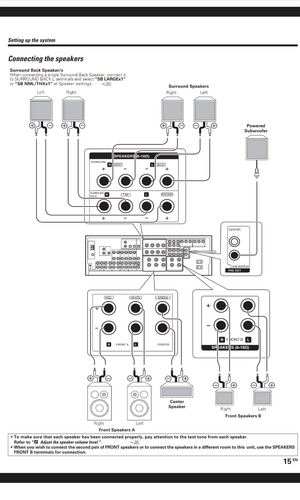
I am attaching an schema of the rear connectors from this home cinema amplifier.
* Chatgpt advised me that schema, but, surprise... It did not work.
It also said that it was the method to-go, because the surround had another amplifier circuit distinct from the main one on the "A" speakers, and thus I would achieve biamp.
It did not recommend to use speaker b connectors from the amplifier because, it said, they were sharing the same amp circuit as those on speaker b, so no real biamp would be achieved...
Many thanks in advance,
Roger
I would appreciate your help if you can offer some tips about how to connect the Re: equipment in that way:
I have already tried to connect the bottom connectors from the speakers to the front surround connectors on the amplifier, and the upper ones from the speakers to the front "A" connectors on the amplifier, but IN THE AMPLIFIER'S PURE "STEREO MODE", no signal is sent to the lower connectors on the speakers (the ones connected to the surround connectors on the amplifier).
I have discovered that by connecting only the lower connectors on the speaker, just to test if the sound reached the speakers.
The only way to get sound from the surround connectors is by activating some (for me) unwanted special effects like DSP, THX...
I want the equipment for music only.
I am attaching an schema of the rear connectors from this home cinema amplifier.
* Chatgpt advised me that schema, but, surprise... It did not work.
It also said that it was the method to-go, because the surround had another amplifier circuit distinct from the main one on the "A" speakers, and thus I would achieve biamp.
It did not recommend to use speaker b connectors from the amplifier because, it said, they were sharing the same amp circuit as those on speaker b, so no real biamp would be achieved...
Many thanks in advance,
Roger

































 Facebook
 Twitter
 Instagram