Please help: Unexpected distortion after upgrading DAC + speakers

FuzzBuster

Active member
Nov 12, 2025
4
1
25
Hi all,

Thanks for reading my post. I recently upgraded from Logitech speakers to Edifier R1280DBs and added an iFi ZEN Air DAC via USB on Windows 10. Overall, sound quality is better, but now I’m hearing distortion across basically the entire frequency range for many songs.

Some tracks sound fine, others grainy or harsh. Interestingly, Logitech speakers seemingly had no such issues (or were they just masked?) , so it’s odd that higher-fidelity gear brings this. Could it be the DAC?

I’ve tried Windows DAC settings (no enhancements, exclusive mode, Foobar2000 via WASAPI—though my Foobar test may not have been perfect), but the problem persists. Time is critical, as I may need to return one or both components if they’re defective.

Anyone else ever had or heard of similar issues? Should I consider a technician-level diagnosis, or is there something else I should check first?

Thanks!
David, near Barcelona, Spain

 
Thanks for your reply. I bought both the speakers and DAC through Amazon. It seems unusual that these items would be defective, but obviously possible.
 
I assume the settings for Foobar2000 were the same for the Logitech?
If I were you, I would return the Edifiers. Don't waste time on it.
Their products are not necessarily pitched for enthusiast of Hifi.
I would exchange them for active Presonus or Mackie's, these will give you better performance across the frequency range.
 
Thanks for your reply! I didn’t actually use Foobar2000 with the Logitech speakers — only with the new setup. Back then I mostly listened through Spotify or YouTube. So it’s possible that the difference in playback chain is also influencing what I’m hearing.

Still, it’s interesting that the Logitechs didn’t seem to distort, even at higher volumes. I’ll keep your suggestion about the Presonus or Mackies in mind if I end up returning the Edifiers.
 
Last edited:
  • Like
Reactions: Jasonovich
Thanks for your reply! I didn’t actually use Foobar2000 with the Logitech speakers — only with the new setup. Back then I mostly listened through Spotify or YouTube. So it’s possible that the difference in playback chain is also influencing what I’m hearing.

Still, it’s interesting that the Logitechs didn’t seem to distort, even at higher volumes. I’ll keep your suggestion about the Presonus or Mackies in mind if I end up returning the Edifiers.
Are you getting the same distortion when you listen to Spotify or YouTube.
If it's just Foobar, try disabling some of the plug ins.

Ok the penny dropped, I recall having distortion coming out from my speakers, I discovered the Realtek motherboard chipset was conflicting with my Eversolo DAC drivers.
The problem disappeared when I disabled all audio drivers and left the Eversolo one active.
Check if you have other audio drivers other than the Ifi that are active, try disabling them

Good luck 😊

 
Last edited:
Thanks again for your reply — I really appreciate your suggestions, and no answer is too basic or repetitive.

To update you on what I’ve tried so far: I played a FLAC file on YouTube, and it sounded distorted. I also tested a FLAC file through Foobar2000 (assuming I set it up correctly), and it sounded terrible as well.

Your edit about potential driver conflicts makes sense (according to A.I.). I’ll check my Device Manager and see if there are any audio drivers besides the iFi DAC active, and try disabling them temporarily to test if that resolves the distortion---if I can. (This is all new to me.)

If you or anyone else could give a quick tip on the safest way to disable other drivers without affecting the rest of my laptop’s audio setup, I would appeciate it. Thanks!
 
Thanks again for your reply — I really appreciate your suggestions, and no answer is too basic or repetitive.

To update you on what I’ve tried so far: I played a FLAC file on YouTube, and it sounded distorted. I also tested a FLAC file through Foobar2000 (assuming I set it up correctly), and it sounded terrible as well.

Your edit about potential driver conflicts makes sense (according to A.I.). I’ll check my Device Manager and see if there are any audio drivers besides the iFi DAC active, and try disabling them temporarily to test if that resolves the distortion---if I can. (This is all new to me.)

If you or anyone else could give a quick tip on the safest way to disable other drivers without affecting the rest of my laptop’s audio setup, I would appeciate it. Thanks!

Allow me to assist 🙂

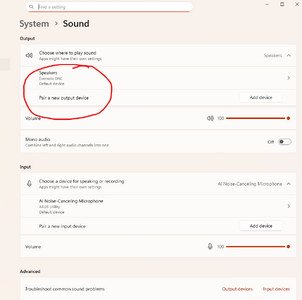
Right click your mouse over the sound icon and select sound settings
1762982033337.png

This will launch System > Sound (below)

On my Window's 11 setup you can see Eversolo DAC driver setup, the others have been manually dismantled.

If you have more than one set up drivers showing on Windows System Sound setup, it will give you the option to disable.

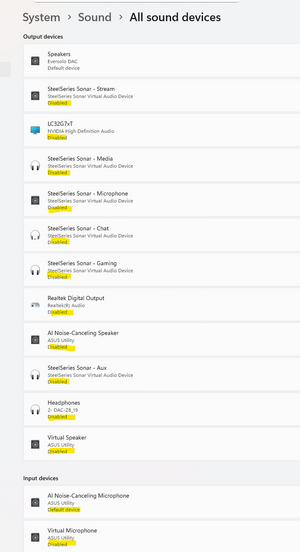
If other drivers are present in addition to to the Ifi, disable those, like I have below 🙂

1762982176925.png

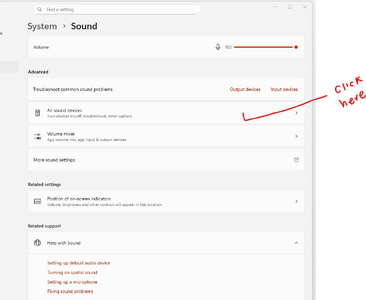
If you then scroll down, you'll see All Sound Devices - click here

1762982856286.png


This will allow you the option to disable the other sound drivers - I use my DAC, so there's no need to use other software.

1762983090309.png

If the problem, still persists - click on to MS support as highlighted in yellow 🙂 This takes you to MS website for further support.

1762983261563.png
 
Hi all,

Thanks for reading my post. I recently upgraded from Logitech speakers to Edifier R1280DBs and added an iFi ZEN Air DAC via USB on Windows 10. Overall, sound quality is better, but now I’m hearing distortion across basically the entire frequency range for many songs.

Some tracks sound fine, others grainy or harsh. Interestingly, Logitech speakers seemingly had no such issues (or were they just masked?) , so it’s odd that higher-fidelity gear brings this. Could it be the DAC?

I’ve tried Windows DAC settings (no enhancements, exclusive mode, Foobar2000 via WASAPI—though my Foobar test may not have been perfect), but the problem persists. Time is critical, as I may need to return one or both components if they’re defective.

Anyone else ever had or heard of similar issues? Should I consider a technician-level diagnosis, or is there something else I should check first?

Thanks!
David, near Barcelona, Spain

I've no idea if this is helpful, but I recently 'upgraded' my PC to Windows 11, and I've seen (heard) similar things. At the moment, I am putting it down to Windows11 re-sampling the music, even though I am notionally using ASIO or WASAPI. But I'm far from convinced this is correct, try as I might to get to the bottom of it. I just don't know what else to try. But your problem has got me thinking, as you are still using W10. 🤔🤔🤔

HTH
 
The dac cost about the same as the speakers, return it and get better speakers

To avoid noise from usb get one of these


Higher tier

Or if it's hum buzz

Higher tier https://www.silentpower.tech/collections/conditioners/products/idefender-max

if usb connection as it is im linking to try inakustik,qed or some other quality brand of usb cable

Some speakers has ground loop filter on the back
 
Try to narrow done the problem.
You probably have a headphone out on the PC. Connect the Edifiers using a 3.5 trs to 2x RCA. If the problem persist, it is not the iFi.
If you happen to have a mobile with a headphone out, do the same. If the problem persist, it is likely the Edifier.
Connect the iFi to a mobile using the USB-C. If the problem is gone, it is the PC

If you have doubt about configuring Windows and/or Foobar, set the sample rate in the Win audio panel equal to the source (audio=44.1 video=48). Set the bit depth to the max supported by the iFi.
 

TRENDING THREADS

Latest posts