Just set up new ATLP120XBTUSB. All seems well, except that it won't connect with Sony XB100, or an old BT speaker I have. Problems like this are usually due to my ignorance. Any ideas? Thank you.
Have you read the manual?
All I can find is this:-
Before pairing the turntable, make certain the PHONO/LINE selector switch on the rear of the turntable is set to LINE.
Position the other Bluetooth receiver device (e.g., speakers or headphones) close to the turntable. This is to make certain the pairing process performs correctly. (Once paired, the devices can be separated by up to 30' line of sight.) Turn the turntable power switch on. The red power LED illuminates and the Bluetooth LED flashes blue, indicating that the Bluetooth transmitter is active and ready to pair.
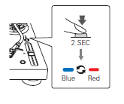
Activate the pairing mode on the other Bluetooth device by following the instructions in that device’s user manual. Press and hold the turntable’s wireless function button for 2 seconds to begin the pairing process. The LED flashes blue/red, signifying the Bluetooth transmitter is in pairing mode. When the turntable successfully pairs, the LED turns solid blue.
The turntable now remains paired with the other device even if power is turned off. Most Bluetooth devices, including the turntable, will pair quickly. If the turntable does not “see” the other Bluetooth device after about 60 seconds, pairing mode automatically times out. If either device times out while trying to pair, simply put them back into pairing mode and repeat the pairing process. When the turntable is transmitting via Bluetooth, the Bluetooth receiving device is used to control volume and other audio-related functions.
































 Pink Triangle LPT Roksan Tabriz ZI underslung Ortofon 510


 Facebook
 Twitter
 Instagram